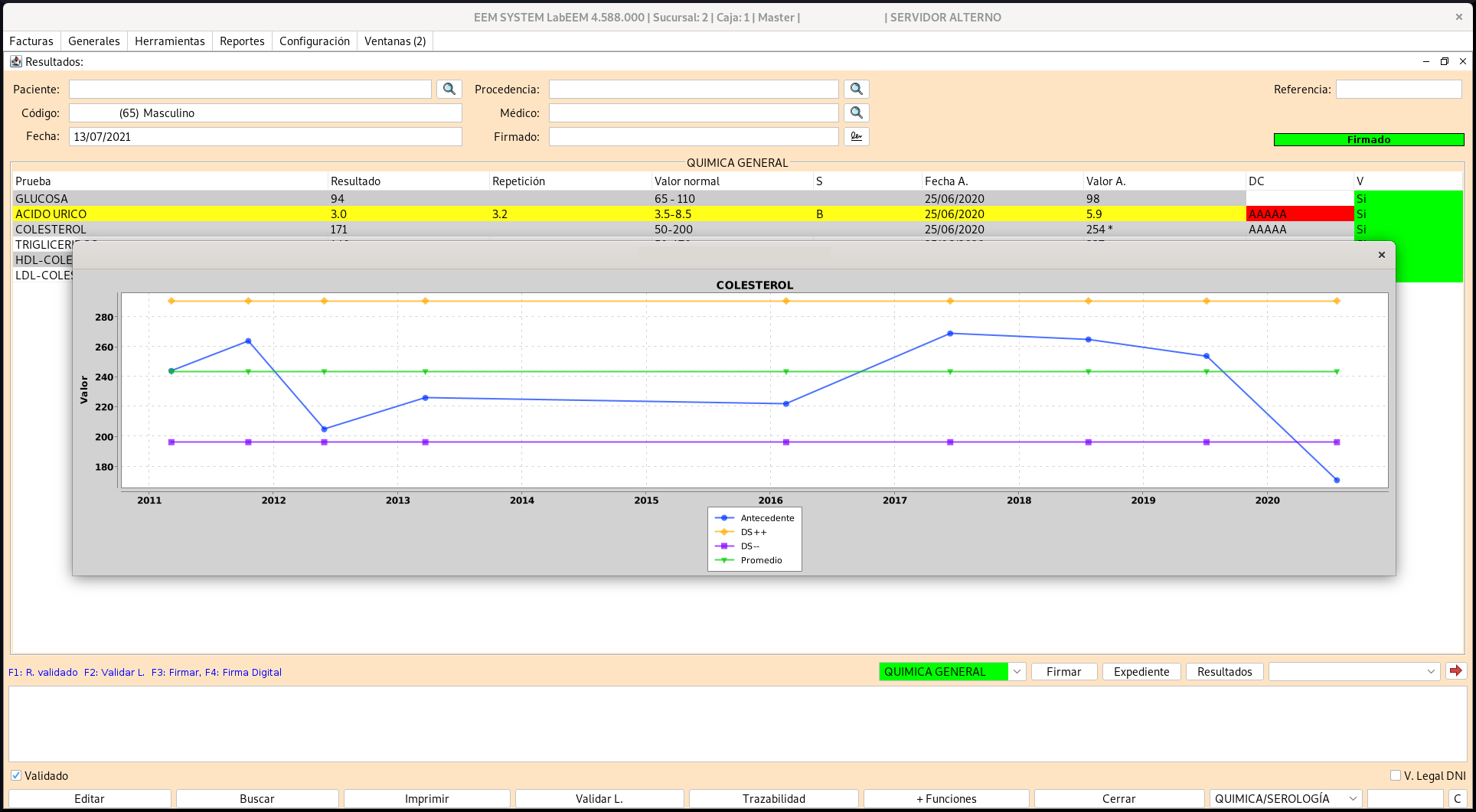
Screenshot of the main interface of LabEEM Plus.

System Description

LabEEM Plus is easy to learn and use for laboratory staff, minimizing errors and training time. It allows adaptation to the specific needs of the laboratory, such as workflows and test panels.

LabEEM Plus has the ability to integrate with Electronic Health Record (EHR) systems, hospital management systems and other medical devices. Support for standards such as HL7, FHIR or ASTM to facilitate data exchange.

LabEEM Plus is an ERP Software for the modern clinical laboratory; beyond being just a LIS, your laboratory will have the entire patient care process centralized from billing to result visualization, automation of your analyzers and graphical analysis of your quality controls.

LabEEM Plus works on any operating system Windows, Linux and Mac, which gives the client greater ease and options when deciding what they want to use.

LabEEM Plus is made for the distributed environment from its design, so it doesn't matter if your laboratory has 10 or more than 100 branches, or if your laboratory has 10 or more than 100 analyzers.

We have the necessary experience to build a structure that allows you to have the server in the cloud or physical in your laboratory, without affecting the operations of the rest of the branches, keeping the information centralized and secure.

If your clinical laboratory's computer solution does not scale very well, if your technicians still do a lot of manual work, if you are exposing your clients' private information on insecure links, call us, we will be happy to help you.

Connected Analyzers

We can connect your equipment from any manufacturer, which results in speed and accuracy in your laboratory, as well as facilitating the work of your technicians helping in the handling of a larger volume of samples. Below is a small list:

  • Abbott Architect
  • Abbott Architect (HL7)
  • Abbott Alinity ci‑series (HL7)
  • SIEMENS Advia Centaur XP
  • ORTHO AutoVue
  • Ortho VISION™
  • ORTHO Optix
  • ORTHO CLINICAL DIAGNOSTICS Vitros 3600
  • ORTHO CLINICAL DIAGNOSTICS Vitros 4600
  • ORTHO CLINICAL DIAGNOSTICS Vitros 5600
  • ORTHO CLINICAL DIAGNOSTICS Vitros 5.1 FS
  • ORTHO CLINICAL DIAGNOSTICS Vitros ECI
  • MindRay 5000 (HL7)
  • MindRay 5150/BC-20s (HL7)
  • MindRay 5380 (HL7)
  • MindRay 5500/5800
  • MindRay 5800 (HL7)
  • MindRay 6000 (HL7)
  • MindRay 6800 (Astm)
  • MindRay 780 (HL7)
  • Mindray BS-800
  • Tosoh AIA-360/2000
  • Tosoh AIA-2000 (HL7)
  • Tosoh G8
  • Tosoh HLC-723GX
  • Tosoh HLC-723G11
  • Sysmex CA500
  • Sysmex CS2100i
  • Sysmex CS2500
  • ORGENTEC Alegria
  • Alifax Roller (BCI)
  • Boditech Afias 1 (Hl7)
  • Boditech Afias 10 (Hl7)
  • Diasorin Liaison ® XL
  • Liaison v2
  • Dymind DF50 (HL7)
  • Dymind DF76 (HL7)
  • Fia Presto (Hl7)
  • Fujifilm NX500i
  • Fujifilm NX700 (Hl7)
  • DIRUI Fus 1000/2000 (HL7)
  • DIRUI Fus 1000/2000
  • Genrui FA 50 (HL7)
  • Genrui GS100 (HL7)
  • Genrui kt-6300 (HL7)
  • Genrui kt-6610 (HL7)
  • Genrui kt-8000 (HL7)
  • IChroma II (HL7)
  • IChroma III (HL7)
  • Inmulite 2000
  • Iris iQ 200
  • Konelab
  • Kontrolab 5h Plus (HL7)
  • KontroLab PL3
  • LabNovation LD-560 (Hl7)
  • LIFOTRONIC eCL8000
  • Lifotronic H8 (Astm)
  • Maglumi 2000 (Hl7)
  • Maglumi 800 (Hl7)
  • Minicap
  • TRINITY BIOTECH Premier Hb9210
  • Rayto ChemRay 420/330
  • Real (Hl7)
  • Snibe Biossays 240 Plus (Hl7)
  • STANDARD F200 (HL7)
  • Tisenc ACCRE 8 (HL7)
  • Urilyzer® Auto (HL7)
  • YD DIAGNOSTICS Uriscan
  • YD DIAGNOSTICS Uriscan Ultra Plus
  • Urit-500c
  • VersaCell®
  • BIOMERIEUX SA FRANCE Vidas/Vidas 3/MiniVidas
  • Vitek
  • YHLO iFlash 3000HI/1200 (Hl7)

*** All analyzer brands and models are intellectual property of their respective manufacturers. ***

System Views

Screenshot of the patient antecedents section in LabEEM Plus.
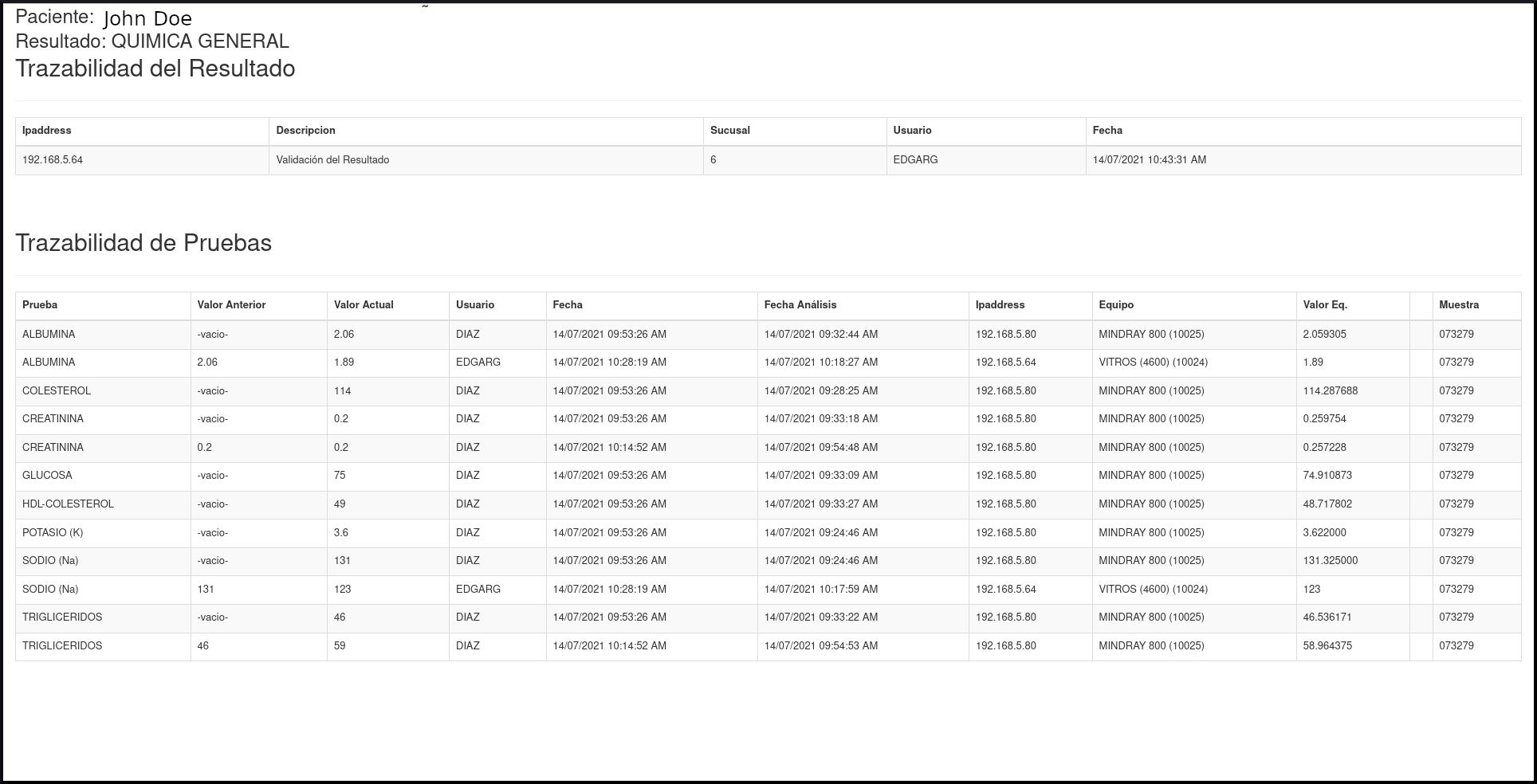
Screenshot of the sample traceability module in LabEEM Plus.
Second screenshot of the patient antecedents section in LabEEM Plus.
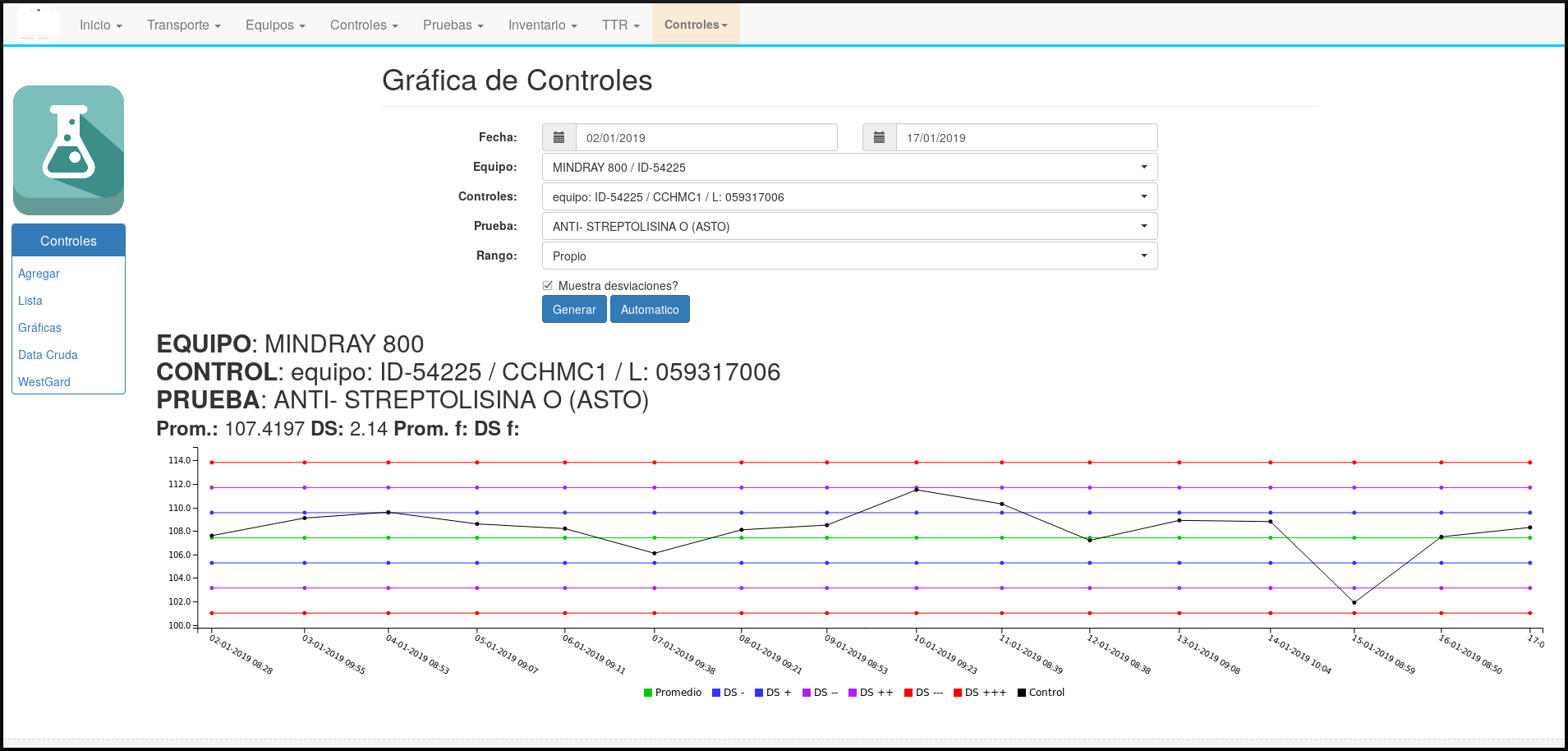
Screenshot of the quality control module in LabEEM Plus.

Main System Features

LabEEM Plus offers a complete suite of functionalities to optimize your laboratory operation.

Invoice icon for billing and income.

Billing and Income

  • Ready for Electronic Billing (DGI) from the system itself. Save time and money.
  • Patient Data.
  • Invoices to different entities with custom calculations and discounts (Personal, Companies, Insurance Co. (automatic copay calculations)).
  • Prices by tests, test packages.
  • Special discounts to companies or patients.
  • Doctor referrals.
  • Payment Methods.
Workflow icon.

Automated Workflow

  • Automated barcode label printing. Unique identification code for each sample.
  • Printing of sample control document for the phlebotomist.
  • Complete sample traceability. Know who, when, where, how much of each value your laboratory produces.
  • Communication with your analyzers indicating tests to be performed, receiving results and quality controls.
  • Online result access for patients, doctors and companies.
  • Automatic sending of results to emails (Patients, Doctors, Companies optional).
  • Results with unique QR Code to guarantee their authenticity.
Quality control icon.

Integrated Quality Control

  • Obtaining quality controls automatically from analyzers.
  • Daily control charts with statistics (deviations and averages) for each analyzer.
  • Automatic alerts announcing control non-compliance (Westgard rules).
Computer icon for analyzer interface.

Analyzer Interface (LIS)

  • Automatic feeding of analyzers based on what is billed to the patient.
  • Automatic obtaining of tests performed by analyzers.
  • Automatic interpretation of qualitative results (positive, negative, reactive, non-reactive).
  • Conversion of units reported by the analyzer.
  • Indicates to the analyzer only the tests that will be repeated due to values out of range, saving time and reagent.
  • Easy to activate/deactivate tests to be performed on a specific analyzer.
  • Connected with analyzers from different commercial houses and different protocols (ASTM, HL7).
Alert icon for result analysis.

Advanced Result Analysis

  • Obtaining processed tests from analyzers.
  • Delta Check based on statistical analysis, where the variation of the current result is analyzed with respect to the result of the last visit.
  • Notices on value variation by unit/day, according to statistics performed with previously stored data.
  • Alert of values out of range, according to data statistics for each test.
  • Real traceability (Analyzer, Date/Time, Technician, Computer) of each result and its repetitions obtained from the different equipment.
  • Results with QR Code to validate their authenticity.
Laboratory icon.

Laboratory Management

  • Sample transport forms (Shipping, Reception, File, Discard).
  • Equipment/Analyzer Identification.
  • Record of repairs and maintenance performed on analyzers.
  • Notices for scheduled maintenance agendas.
  • Configuration of tests, types of containers and samples.
  • Creation of reagent and supply requisitions for the purchasing Dept.

Technologies we trust